Security alert: Windows 11 laptops

A security vulnerability affecting Windows 11 laptops has been identified. This is a global issue, and we are awaiting a fix from Microsoft. Increased vigilance is required until a fix has been provided.

Key risk

If a device is lost or stolen, any sensitive information stored on the laptop could be accessed.

Required additional actions

  • If you need to travel for work purposes (domestic or international) with your laptop, please contact the ITDS Service Desk in advance so we can add a temporary fix to ensure your device is secured
  • For all normal use, please be extra careful when transporting or using your Windows 11 laptop in a public setting.

General safety

  • Please remember it’s your responsibility to take appropriate care of your BU-provided devices. This applies at all times
  • Ensure your laptop/mobile device remains on your person or stored safely, such as in a locked drawer or secure office
  • Take additional care when travelling, working remotely, or using your laptop in public places
  • When working from home, only you should use your laptop
  • Report any lost, stolen or misplaced device immediately by calling the IT Service Desk 01202 965515 or 0808 196 2332.

How to identify if your BU assigned laptop is running Windows 11

  1. Right click on the start menu
  2. Select “System”
  3. On this page scroll down to ‘Windows specifications’ look for ‘Edition’. If this contains ‘Windows 11’, the laptop is running Windows 11 and is affected by this security vulnerability.

The Windows 11 rollout is currently paused. If you haven’t upgraded yet, you won’t be able to do so for now.

We’ll share an update once we have more information from Microsoft.

[Critical] Emergency Security Update for Google Chrome: CVE-2026-3909 and CVE-2026-3910

[Nano banana]

There have been two high-severity zero-day vulnerabilities identified in Google Chrome that are confirmed to be actively exploited in the wild. These flaws allow attackers to execute malicious code or gain unauthorized memory access simply by tricking a user into visiting a compromised website.

  • CVE-2026-3909 (Out-of-bounds write in Skia): A flaw in the graphics engine that can lead to memory corruption and potential code execution.
  • CVE-2026-3910 (Inappropriate implementation in V8): A vulnerability in the JavaScript/WebAssembly engine allowing arbitrary code execution within the browser sandbox.

Impact

A remote attacker can leverage these vulnerabilities to compromise your device, steal sensitive data, or install malware. Because Chrome is a primary tool for university work and SaaS applications, these flaws represent a significant risk to personal and institutional information security.

Required Action

Staff and students are advised to manually trigger an update for their Chrome browser immediately.

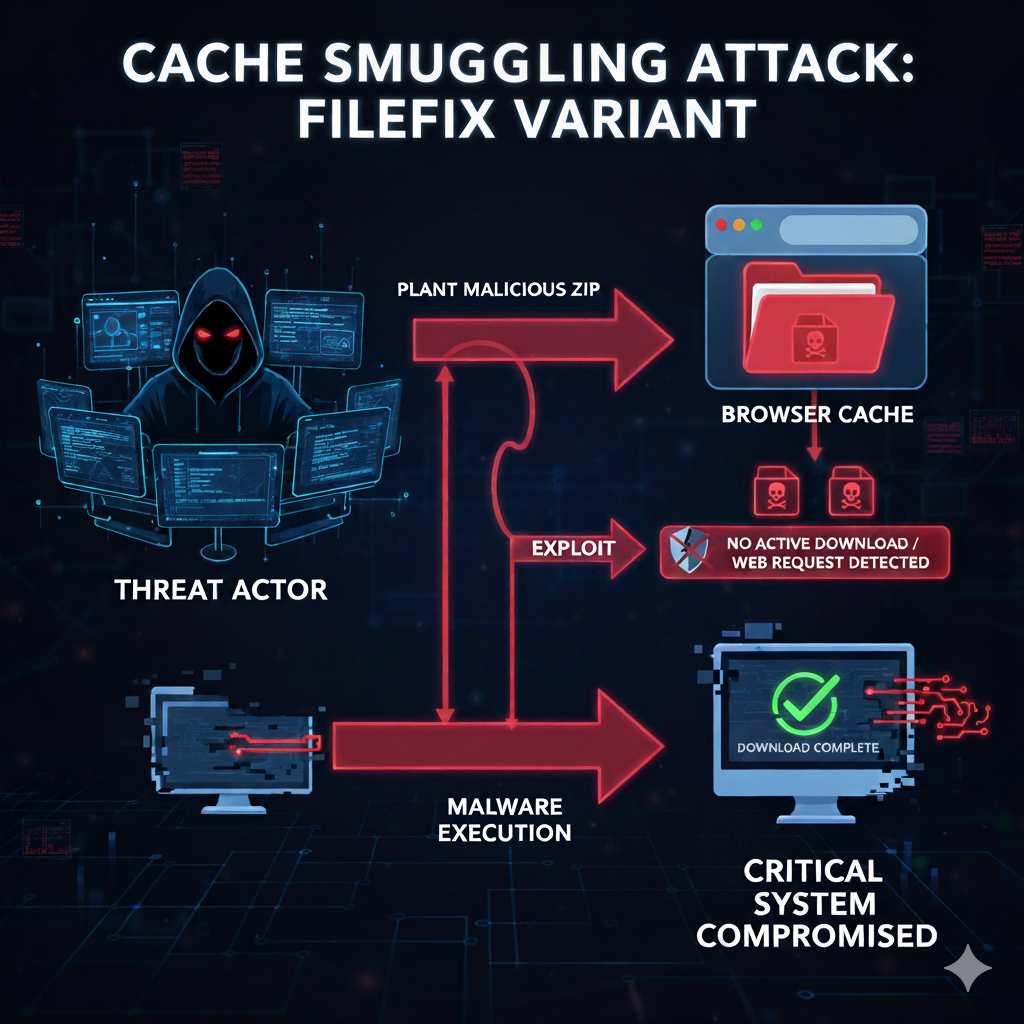
New FileFix attack uses cache smuggling to evade security software

(Image from Google Gemini.)

BLUF: Threat actors are using a sophisticated variant of the FileFix social engineering attack, known as cache smuggling. It plants malicious ZIP archives in a victim’s browser cache. This enables execution of malware while bypassing security software checks for active file downloads or web requests.

The new FileFix campaign lures victims with a spoofed tool such as “Fortinet VPN Compliance Checker.” The user is told to copy a seemingly innocuous network file path and paste it into the Windows File Explorer address bar.

However, the text copied to the clipboard is heavily padded with spaces, concealing a malicious PowerShell command that is executed in headless mode when the user presses Enter.

The principle behind the attack is ‘cache smuggling’. When the user accesses the phishing page for the first time, JavaScript requests the browser to fetch a payload which has been disguised as a legitimate JPEG image. The browser caches this file, which actually contains a malicious ZIP archive.

The PowerShell script scans the local browser cache, extracts the hidden archive, and launches the malware from the local system without initiating any new web requests.

This method circumvents established security programmes that monitor network traffic or file downloads. The technique is being rapidly adopted by various threat actors, including ransomware gangs.

Action points

  • It is critically important to never copy and paste text or commands provided by an external website into operating system dialogue boxes, terminal windows, or address bars.
  • Organisationally, Endpoint Detection and Response (EDR) capabilities should be used that look for PowerShell scripts interacting with or manipulating browser cache files, or which execute in a hidden (headless) manner. These are clear indicators of this attack vector.
  • Browsers and security software should restrict or audit the automatic execution of files retrieved from the browser cache by command-line utilities.
  • Consider implementing’zero trust’ security policies that limit the execution of unrecognised executable files, even if they originate from what appears to be a local path, such as the extracted file from the cache.

Read more here.

Yearbook phishing campaign

by Morgan Brazier

A moderately sophisticated phishing campaign has been observed targeting multiple universities including Bournemouth University, Brighton and Warwick.

The email and subsequent registration portal masquerades as a university yearbook to harvest personally identifiable information (PII) and card details, tricking users into submitting payment and sensitive information by creating convincing emails already containing their first name and university.

Similar campaigns have been seen this time last year from different domains.

If you have been affected by this phishing campaign it is recommended you report the incident to both Action Fraud and the BU IT help desk:

https://www.actionfraud.police.uk

https://www.bournemouth.ac.uk/news/2019-03-04/contacting-it-service-desk

‘CovidLock’ Exploits Coronavirus Fears With Bitcoin Ransomware

From cointelegraph.com

Opportunistic hackers are increasingly seeking to dupe victims using websites or applications purporting to provide information or services pertaining to coronavirus.

Cybersecurity threat researchers, DomainTools, have identified that the website coronavirusapp.site facilitates the installation of a new ransomware called “CovidLock.”

The website prompts its visitors to install an Android application that purportedly tracks updates regarding the spread of COVID-19, claiming to notify users when an individual infected with coronavirus is in their vicinity using heatmap visuals.

Read more…

Elevated phishing activity at BU

For the past couple of days BU has been targeted through spear phishing emails. Users should be alert on any emails coming from student accounts with a subject related to academic activities (projects, guest lecturers, etc.)

TV licensing suffers data breach

Following this statement from tvlicensing.co.uk, customers who used their services to pay for their tv licensing fees between 29 August until around 3.20pm on 5 September 2018 may have their details compromised. The company reports that this was due to a technical update and during that period the transactions were not as secure as intended.